San Andreas / Другое / Вспомогательные файлы
GTA V Entire bh1_48 (Map Portion Port) for SA
- TheNathanNS | загрузил TheNathanNS
- youtube.com/user/thenathanns
- 11/02/2015
- 19845 Скачивания
Оценки:
Сначала войди в аккаунт.
Избранное:
Видео
Видео пока не добавлены.Войди в аккаунт, чтобы добавить видео к этому моду.
Описание
GTA 5 ENTIRE BH1_48 (Map Area) PORT TO GTA SA!
By TheNathanNS
1.) Description
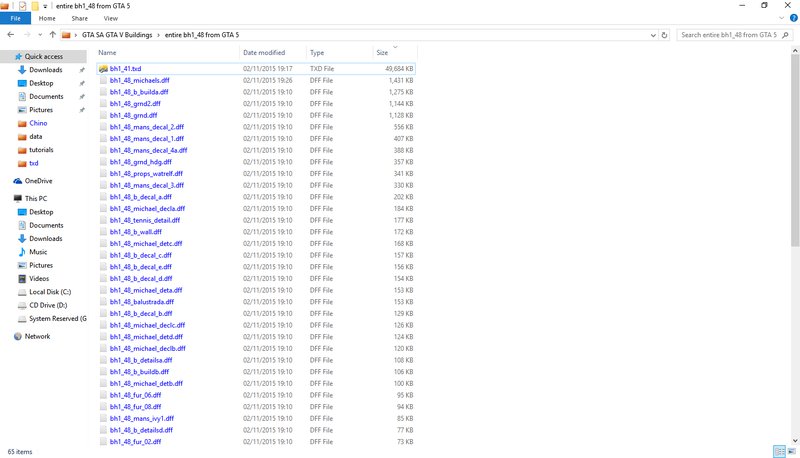
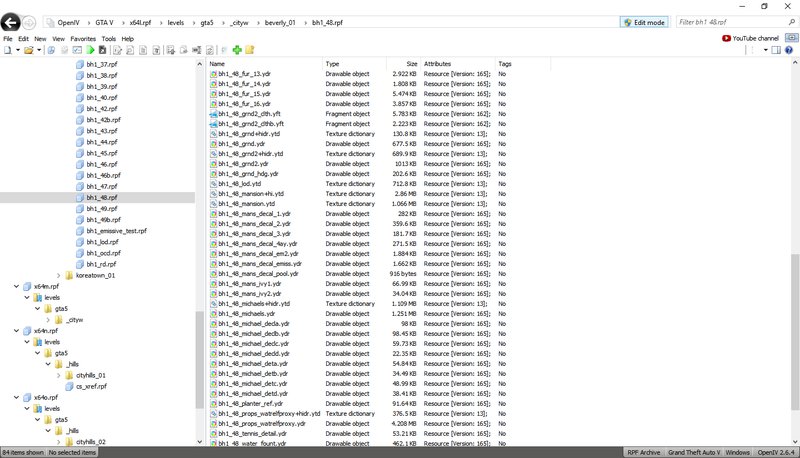
This mod contains ALL the files from the bh1_48.rpf in GTA 5.
Converted to GTA SA.
THIS IS NOT A PRECONFIGURED MAP MOD.
YOU need to place the map objects yourself using ME
The mod contains:
* ALL .ydd files from inside the RPF
* A merged .ytd (to hopefully prevent texture issues, NO gaurantees it's 100% perfect.) (Size of TXD is around 48mb)
* A LOCKED .ytd (To prevent mod theft, sorry people I'm not taking chances on mods like this.)
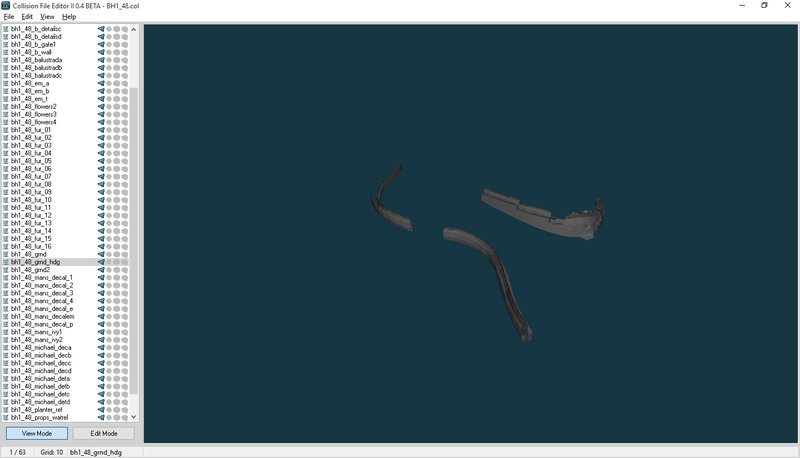
* All .ydd's are in a single collision. (So map makers can hopefully make use of everything without crashing)
* The direct co-ordinates GTA 5 uses. (See the text file)
2.) Installation
This is not a pre-configured mod.
As this is an entire map portion-port, you need to use Notepad/Map Editor to place the objects yourself manually, since the original GTA 5 co-ordinates will cause a collision (not a crash, just it'll be horrible).
OR
You can use this in your total conversion mod.
3.) Credits
Thanks to DK22PAC for his GTA V conversion tool and Magic TXD Builder
Everything else done by TheNathanNS
By TheNathanNS
1.) Description
This mod contains ALL the files from the bh1_48.rpf in GTA 5.
Converted to GTA SA.
THIS IS NOT A PRECONFIGURED MAP MOD.
YOU need to place the map objects yourself using ME
The mod contains:
* ALL .ydd files from inside the RPF
* A merged .ytd (to hopefully prevent texture issues, NO gaurantees it's 100% perfect.) (Size of TXD is around 48mb)
* A LOCKED .ytd (To prevent mod theft, sorry people I'm not taking chances on mods like this.)
* All .ydd's are in a single collision. (So map makers can hopefully make use of everything without crashing)
* The direct co-ordinates GTA 5 uses. (See the text file)
2.) Installation
This is not a pre-configured mod.
As this is an entire map portion-port, you need to use Notepad/Map Editor to place the objects yourself manually, since the original GTA 5 co-ordinates will cause a collision (not a crash, just it'll be horrible).
OR
You can use this in your total conversion mod.
3.) Credits
Thanks to DK22PAC for his GTA V conversion tool and Magic TXD Builder
Everything else done by TheNathanNS
Комментарии
Опубликовано комментариев: 17.





12/04/2015 23:02
@TheNathanNS 10/10 @ThatsMe i am gonna use my super power again to rate the mod after two weeks
man this is crazy this mod need to get infinity 10/10 rates
Цитировать | Ответить | (4)
@TheNathanNS 10/10 @ThatsMe i am gonna use my super power again to rate the mod after two weeks
man this is crazy this mod need to get infinity 10/10 rates
Цитировать | Ответить | (4)
12/04/2015 22:59
dont miss to credit nathan
Цитировать | Ответить | (3)
Quote: ThatsMeit isnt a s*** lolQuote: shitanus
how to install this s*** ??
it is for a map editor
you can install it and then place the objects with map editor
these gonna be on my mta server...
soon video
dont miss to credit nathan
Цитировать | Ответить | (3)

11/03/2015 16:53
tested michael vegetation
works perfectly
its on the beach now :P
Цитировать | Ответить | (3)
tested michael vegetation
works perfectly
its on the beach now :P
Цитировать | Ответить | (3)
11/03/2015 15:55
and some objects like this mod
have more objects than one and they have one .col file
that have every object
so you need to use col editor etc
i suggest dont using it just wait for my video to see them and wait for my server to play with them

Цитировать | Ответить | (2)
you need to write a script (im a newbie in this and i just copy the script that my friend created and im changing object id model texture and colision)Quote: shitanus
@ThatsMe ok i have MTA
and some objects like this mod
have more objects than one and they have one .col file
that have every object
so you need to use col editor etc
i suggest dont using it just wait for my video to see them and wait for my server to play with them
Цитировать | Ответить | (2)

11/03/2015 15:50
@ThatsMe lets say i just dont know how to use standard map editor
and mta editor is hard to replace objects (if you are used to it then it is easy)
Цитировать | Ответить | (1)
@ThatsMe lets say i just dont know how to use standard map editor
and mta editor is hard to replace objects (if you are used to it then it is easy)
Цитировать | Ответить | (1)
11/03/2015 15:46
to replace it isnt needed to replace it
map editor loads custom objects
but the thing is that i dont know how to use med (gta sa map editor)
thats why im using mta map editor it requires more work for replacing object and i can't tell you what you need to do in mta map editor
Цитировать | Ответить | (2)
well im not that good in map editorQuote: shitanus
@ThatsMe how to replace and how to use map editor
to replace it isnt needed to replace it
map editor loads custom objects
but the thing is that i dont know how to use med (gta sa map editor)
thats why im using mta map editor it requires more work for replacing object and i can't tell you what you need to do in mta map editor
Цитировать | Ответить | (2)
11/03/2015 15:15
it is for a map editor
you can install it and then place the objects with map editor
these gonna be on my mta server...
soon video
Цитировать | Ответить | (4)
it isnt a s*** lolQuote: shitanus
how to install this s*** ??
it is for a map editor
you can install it and then place the objects with map editor
these gonna be on my mta server...
soon video
Цитировать | Ответить | (4)
11/03/2015 09:41
Really useful for experimenting and CReating some stuntage or Video/ Thanks Nathan!
Цитировать | Ответить | (0)
Really useful for experimenting and CReating some stuntage or Video/ Thanks Nathan!
Цитировать | Ответить | (0)




11/03/2015 01:59
@BGFplayerrr
Objects are what are defined in any map .IDE file.
You can manually create the objects by opening up the .IDE in Notepad.
Sorry the mod isn't pre-configured, I have a huge prop pack in the making. :D
Цитировать | Ответить | (0)
@BGFplayerrr
Objects are what are defined in any map .IDE file.
You can manually create the objects by opening up the .IDE in Notepad.
Sorry the mod isn't pre-configured, I have a huge prop pack in the making. :D
Цитировать | Ответить | (0)
11/03/2015 01:10
Natalya forgiveness but ... What is this exactly are objects for GTA SA ??

Цитировать | Ответить | (1)
Natalya forgiveness but ... What is this exactly are objects for GTA SA ??
Цитировать | Ответить | (1)