San Andreas / Моды / CLEO-моды
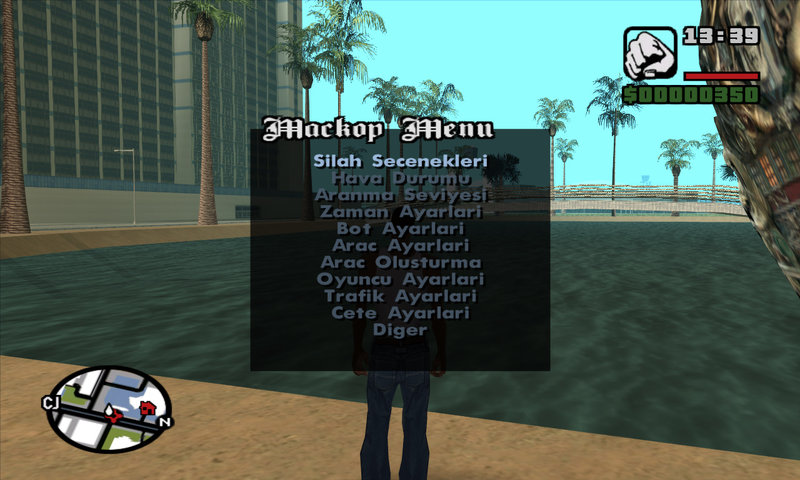
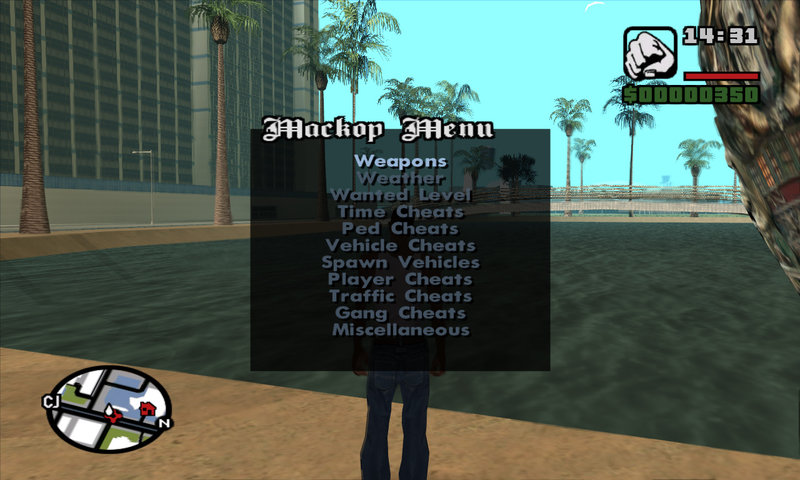
Mackop Menu - Cheat Menu TR-EN
- Mackop | загрузил By MackoP
- 07/26/2015
- 662996 Скачивания
Оценки:
Сначала войди в аккаунт.
Избранное:
Скачать
39.94Kb
39.94Kb
Videos

Войди в аккаунт, чтобы добавить видео к этому моду.
Описание
English:
Drag "cleo" folder to "GTA San Andreas" root directory
To open the menu press CTRL + C keys.
Have Fun...
Turkish:
"Cleo" dosyasını "GTA San Andreas"ın kök dizinine atın.
Menüyü açmak için CTRL + C tuşlarını kullanın.
İyi eğlenceler...
Drag "cleo" folder to "GTA San Andreas" root directory
To open the menu press CTRL + C keys.
Have Fun...
Turkish:
"Cleo" dosyasını "GTA San Andreas"ın kök dizinine atın.
Menüyü açmak için CTRL + C tuşlarını kullanın.
İyi eğlenceler...
Комментарии
Опубликовано комментариев: 21.






04/19/2021 04:54
This is a good trainer but when i use it to get satchel charges the detonator is invisible
Цитировать | Ответить | (0)
This is a good trainer but when i use it to get satchel charges the detonator is invisible
Цитировать | Ответить | (0)










02/05/2016 01:20
@LanceUppercut For some strange reason the select button is space hope this helps
Цитировать | Ответить | (4)
@LanceUppercut For some strange reason the select button is space hope this helps
Цитировать | Ответить | (4)
01/25/2016 04:44
May be a silly Q, but how do you navigate within the menu, or even exit it? Once hitting ctrl+c I was only able to use the arrows to go up & down. I wasn't able to enter the sub-menus or exit the menu.
Цитировать | Ответить | (7)
May be a silly Q, but how do you navigate within the menu, or even exit it? Once hitting ctrl+c I was only able to use the arrows to go up & down. I wasn't able to enter the sub-menus or exit the menu.
Цитировать | Ответить | (7)

09/02/2015 09:45
the read me does not explain much - where do i copy the unziped files into?
Цитировать | Ответить | (6)
the read me does not explain much - where do i copy the unziped files into?
Цитировать | Ответить | (6)