San Andreas / Моды / CLEO-моды
Visual Skin Selector v1.0
- Chel555 | загрузил Chel555
- 06/25/2017
- 68379 Скачивания
Оценки:
Сначала войди в аккаунт.
Избранное:
Скачать
1,016.48Kb
1,016.48Kb
Videos
Видео пока не добавлены.Войди в аккаунт, чтобы добавить видео к этому моду.
Описание
Description:
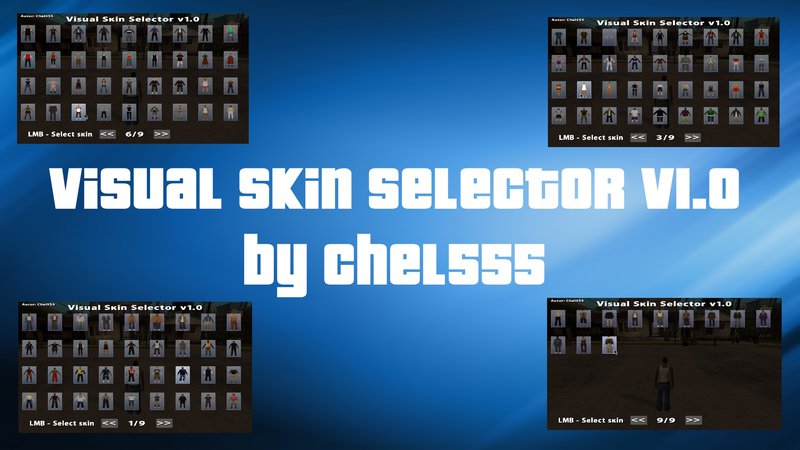
This script adds a visual skin selector with displaying images of standard skins. Now you can change the player skin to any standard (0-299) with a user-friendly visual interface.
Features:
- You can change all the standard skins that are in the game.
- You can change the special skins that are used in the cutscenes and missions.
It is NOT recommended to use the spent crack and others, in which the English letters are replaced by Russians. The selector has only English localization, and those who have similar russifiers, there may be problems with incorrect display of letters in the inscriptions in the game itself, using this selector.
Requires CLEO v4.3 library
Installation:
The contents of the archive to throw in the folder with the game, agreeing to replace.
Activating the selector:
Default H + 4 (The player must NOT be in the transport). Also you can change the two keys in the INI file VSS.ini
Acknowledgments :.
DK22Pac for helping to fix one known bug.
Demonstration of the script: https://youtu.be/CcnGdNm11CQ
This script adds a visual skin selector with displaying images of standard skins. Now you can change the player skin to any standard (0-299) with a user-friendly visual interface.
Features:
- You can change all the standard skins that are in the game.
- You can change the special skins that are used in the cutscenes and missions.
It is NOT recommended to use the spent crack and others, in which the English letters are replaced by Russians. The selector has only English localization, and those who have similar russifiers, there may be problems with incorrect display of letters in the inscriptions in the game itself, using this selector.
Requires CLEO v4.3 library
Installation:
The contents of the archive to throw in the folder with the game, agreeing to replace.
Activating the selector:
Default H + 4 (The player must NOT be in the transport). Also you can change the two keys in the INI file VSS.ini
Acknowledgments :.
DK22Pac for helping to fix one known bug.
Demonstration of the script: https://youtu.be/CcnGdNm11CQ
Комментарии
Опубликовано комментариев: 23.








02/06/2018 00:30
@Tsubasa257 o dios mio alguien que habla español
me sorprende encontrar alguien que habla español aca en esta pagina
Цитировать | Ответить | (0)
@Tsubasa257 o dios mio alguien que habla español
me sorprende encontrar alguien que habla español aca en esta pagina
Цитировать | Ответить | (0)

11/27/2017 23:55
@Scooper pues no se si habre explicado mejor o no me habras entendido xD,pero bueno intentare ver si estara disponible para ver skins importados,gracias de todos mods xD,por cierto el link qe me mantastes es un skin selector anterior usa hasta hoy
Цитировать | Ответить | (1)
@Scooper pues no se si habre explicado mejor o no me habras entendido xD,pero bueno intentare ver si estara disponible para ver skins importados,gracias de todos mods xD,por cierto el link qe me mantastes es un skin selector anterior usa hasta hoy
Цитировать | Ответить | (1)

11/26/2017 22:19
@Tsubasa257 Ah. Para hacer eso tendrias que reemplazar las texturas dentro del mod. En el archivo: models > txd > VSS.txd.
Claro... tendrias que crearlas tu mediante GGMM o algo asi... pero es bastante trabajo para ver un skin XD
P.S. Tambien hay un mod similar a este, pero con un menu basado solo en los nombres/ids de los personajes:
Skin Selector
https://www.mixmods.com.br/2015/08/skin-selector.html
Цитировать | Ответить | (0)
@Tsubasa257 Ah. Para hacer eso tendrias que reemplazar las texturas dentro del mod. En el archivo: models > txd > VSS.txd.
Claro... tendrias que crearlas tu mediante GGMM o algo asi... pero es bastante trabajo para ver un skin XD
P.S. Tambien hay un mod similar a este, pero con un menu basado solo en los nombres/ids de los personajes:
Skin Selector
https://www.mixmods.com.br/2015/08/skin-selector.html
Цитировать | Ответить | (0)
11/25/2017 23:43
@Scooper osea me refiero que si en el menu tambiem podre ver a los skin importados de gtainside como de spiderman,hulk,batman,goku,etc tambiem podre ver esos personajes o no.
Цитировать | Ответить | (0)
@Scooper osea me refiero que si en el menu tambiem podre ver a los skin importados de gtainside como de spiderman,hulk,batman,goku,etc tambiem podre ver esos personajes o no.
Цитировать | Ответить | (0)
11/25/2017 10:43
@Tsubasa257 La version mas reciente de cleo es la v4:
https://www.mixmods.com.br/2014/02/Livraria-CLEO.html
Bueno, dentro del menu de este mod veras los personajes originales del SA. Pero al elegirlo aparece el skin que tu hayas instalado
Цитировать | Ответить | (0)
@Tsubasa257 La version mas reciente de cleo es la v4:
https://www.mixmods.com.br/2014/02/Livraria-CLEO.html
Bueno, dentro del menu de este mod veras los personajes originales del SA. Pero al elegirlo aparece el skin que tu hayas instalado
Цитировать | Ответить | (0)
11/24/2017 17:55
@Scooper que cleo usas version y sabes si se pueden ver los skins personalizados que uno pone
Цитировать | Ответить | (0)
@Scooper que cleo usas version y sabes si se pueden ver los skins personalizados que uno pone
Цитировать | Ответить | (0)

11/13/2017 08:13
When I click LMB to choose a skin, nothing happens, even the menu still stays on screen.
Цитировать | Ответить | (0)
When I click LMB to choose a skin, nothing happens, even the menu still stays on screen.
Цитировать | Ответить | (0)

10/14/2017 12:57
Классный скрипт! Вообще серия визуальных модов крутая, даже не открывая код, вижу большую работу. Так держать!
Цитировать | Ответить | (0)
Классный скрипт! Вообще серия визуальных модов крутая, даже не открывая код, вижу большую работу. Так держать!
Цитировать | Ответить | (0)

09/02/2017 23:04
Збс тема, но не хватает отображения названия dff-модели педа - при тестах особенно, когда меняешь на первого попавшегося.
Если будет вторая версия - вместо текста про левую кнопку мыши можно выводить имя модели. Либо воощбе запилить отдельно чисто "текстовый" селектор - как карспаунер у ZAZа.
Цитировать | Ответить | (0)
Збс тема, но не хватает отображения названия dff-модели педа - при тестах особенно, когда меняешь на первого попавшегося.
Если будет вторая версия - вместо текста про левую кнопку мыши можно выводить имя модели. Либо воощбе запилить отдельно чисто "текстовый" селектор - как карспаунер у ZAZа.
Цитировать | Ответить | (0)


07/24/2017 21:56
@Scooper entonces voy a probar, a ver si me funciona a mi tambien.
Цитировать | Ответить | (0)
@Scooper entonces voy a probar, a ver si me funciona a mi tambien.
Цитировать | Ответить | (0)
07/24/2017 11:07
@RackZharp Yo tengo instalado todos esos mods y funcionan perfectamente.
Цитировать | Ответить | (0)
@RackZharp Yo tengo instalado todos esos mods y funcionan perfectamente.
Цитировать | Ответить | (0)

07/08/2017 04:41
@RackZharp please send me link on mod visual vehicle player
Цитировать | Ответить | (0)
@RackZharp please send me link on mod visual vehicle player
Цитировать | Ответить | (0)
07/08/2017 03:48
What if I have the visual vehicle player installed and I want to install this visual skin selector and visual weapons selector, will the game crash?
I'm sorry for my bad English, I speak Spanish, I'm from Latin America ...
Цитировать | Ответить | (0)
What if I have the visual vehicle player installed and I want to install this visual skin selector and visual weapons selector, will the game crash?
I'm sorry for my bad English, I speak Spanish, I'm from Latin America ...
Цитировать | Ответить | (0)