GTA V / Авиация
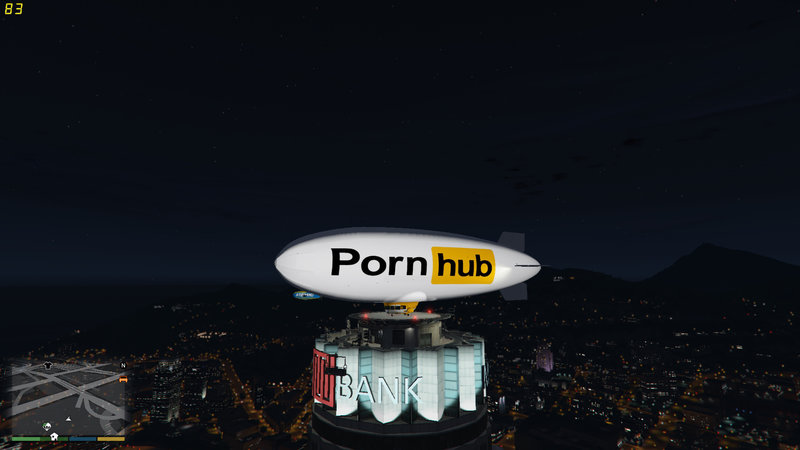
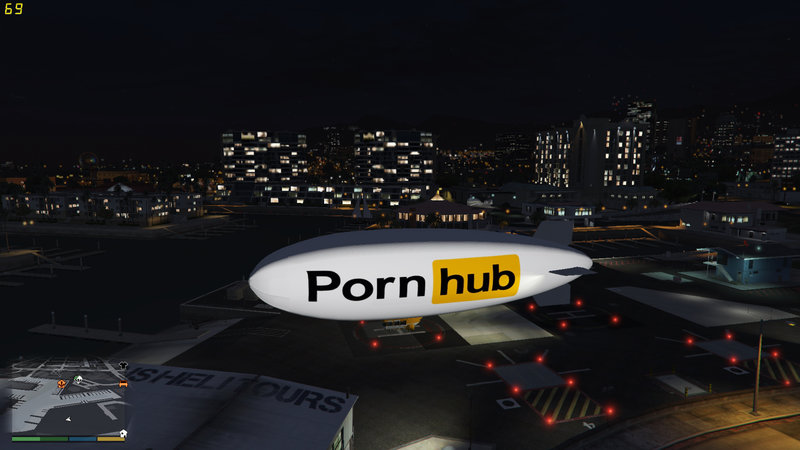
PornHub Blimp
- MrSupercar55 | загрузил MrSupercar55
- 03/20/2017
- 6746 Скачивания
Оценки:
Сначала войди в аккаунт.
Избранное:

Видео

Войди в аккаунт, чтобы добавить видео к этому моду.
Описание
An arousing airship.
Installation:
Using OpenIV, access C:\Program Files (x86)\Steam\steamapps\common\Grand Theft Auto V\x64w.rpf\dlcpacks\spupgrade\dlc.rpf\x64\levels\gta5\vehicles\upgradevehicles.rpf\. Enable "Edit Mode" and replace the "blimp2" texture in blimp2.ytd and blimp2+hi.ytd with the one provided.
N.B. If you want it to replace the Atomic Blimp, go to C:\Program Files (x86)\Steam\steamapps\common\Grand Theft Auto V\x64e.rpf\levels\gta5\vehicles.rpf\ and replace the "blimp_sign_1" texture in blimp2.ytd and blimp2+hi.ytd with the "blimp2" texture herein, but that will need to be renamed to "blimp_sign_1". Mine replaces the Xero Blimp.
Installation:
Using OpenIV, access C:\Program Files (x86)\Steam\steamapps\common\Grand Theft Auto V\x64w.rpf\dlcpacks\spupgrade\dlc.rpf\x64\levels\gta5\vehicles\upgradevehicles.rpf\. Enable "Edit Mode" and replace the "blimp2" texture in blimp2.ytd and blimp2+hi.ytd with the one provided.
N.B. If you want it to replace the Atomic Blimp, go to C:\Program Files (x86)\Steam\steamapps\common\Grand Theft Auto V\x64e.rpf\levels\gta5\vehicles.rpf\ and replace the "blimp_sign_1" texture in blimp2.ytd and blimp2+hi.ytd with the "blimp2" texture herein, but that will need to be renamed to "blimp_sign_1". Mine replaces the Xero Blimp.
Комментарии
Опубликовано комментариев: 7.











 lol
lol