GTA IV / Скины / Причёски и бороды
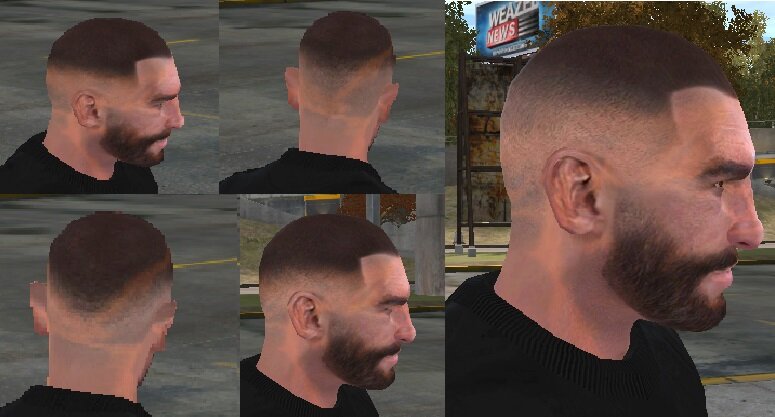
Niko Fade buzzcut pack
- Maz Magdy | загрузил Maz Magdy
- 04/22/2026
- 2766 Скачивания
Оценки:
Сначала войди в аккаунт.
Избранное:
Видео
Видео пока не добавлены.Войди в аккаунт, чтобы добавить видео к этому моду.
Описание
Hello Boys, I hope you're doing great.
Today I present Fade buzzcut pack (Drop fade, High fade, Mid fade)
If someone can fix the orange line in niko's head. Please let me know how.
#####################################
Simply, you need (OPEN_IV) to add these textures in playerped.rpf
You need any trainer, to change (Model) of hair to the bald and also change (Texture) to my mod.
I recommend using : ZMenuIV (Zolika) v23.09.18.2 Trainer
########
Timecyc used in screenshots : ALI Timecyc
Today I present Fade buzzcut pack (Drop fade, High fade, Mid fade)
If someone can fix the orange line in niko's head. Please let me know how.
#####################################
Simply, you need (OPEN_IV) to add these textures in playerped.rpf
You need any trainer, to change (Model) of hair to the bald and also change (Texture) to my mod.
I recommend using : ZMenuIV (Zolika) v23.09.18.2 Trainer
########
Timecyc used in screenshots : ALI Timecyc
Комментарии
Опубликовано комментариев: 14.


08/27/2026 15:37
Great mod 10/10.
"You need any trainer, to change (Model) of hair to the bald and also change (Texture) to my mod."
If you don't want to use any trainer, you need to change these files
hair_diff_000_a_uni.wtd
hair_diff_001_a_uni.wtd
hair_diff_002_a_uni.wtd
to Empty.
Цитировать | Ответить | (0)
Great mod 10/10.
"You need any trainer, to change (Model) of hair to the bald and also change (Texture) to my mod."
If you don't want to use any trainer, you need to change these files
hair_diff_000_a_uni.wtd
hair_diff_001_a_uni.wtd
hair_diff_002_a_uni.wtd
to Empty.
Цитировать | Ответить | (0)

04/26/2026 16:49
@Maz Magdy download the NVIDIA DDS plugin for Photoshop. or use a website like photopea to convert it to DDS
Цитировать | Ответить | (1)
@Maz Magdy download the NVIDIA DDS plugin for Photoshop. or use a website like photopea to convert it to DDS
Цитировать | Ответить | (1)
04/26/2026 04:31
@TIMMY1803 How do I save it DDS in photoshop? I don't have this option.
Цитировать | Ответить | (1)
@TIMMY1803 How do I save it DDS in photoshop? I don't have this option.
Цитировать | Ответить | (1)
04/25/2026 22:57
When exporting the edited texture, you must save as:
DDS
Compression: BC3 / DXT5
Mipmaps: ON
sRGB: ON
Extra channel as opacity: ON (this keeps the alpha)
that will remove the orange line
Цитировать | Ответить | (1)
When exporting the edited texture, you must save as:
DDS
Compression: BC3 / DXT5
Mipmaps: ON
sRGB: ON
Extra channel as opacity: ON (this keeps the alpha)
that will remove the orange line
Цитировать | Ответить | (1)
04/24/2026 10:40
@Maz MagdyIt would be great a nice hairstyle (you already did it) and a shaved face. The next level of well-being.
Цитировать | Ответить | (1)
@Maz MagdyIt would be great a nice hairstyle (you already did it) and a shaved face. The next level of well-being.
Цитировать | Ответить | (1)
04/24/2026 07:53
@Johnny97 You want it clean shaven or low stubble beard?
Цитировать | Ответить | (0)
@Johnny97 You want it clean shaven or low stubble beard?
Цитировать | Ответить | (0)
04/23/2026 19:46
i read online before something about the orange lines is the cause the texture isnt right like the dds settings are messed up or something, the gta 4 modding discord should know
Цитировать | Ответить | (0)
i read online before something about the orange lines is the cause the texture isnt right like the dds settings are messed up or something, the gta 4 modding discord should know
Цитировать | Ответить | (0)