GTA IV / Моды / Скриптовые моды (например, *.lua и *.asi)
Rent-a-Car Mod ver1.1
- endosan
- 10/24/2009
- 19856 Скачивания
Оценки:
Сначала войди в аккаунт.
Избранное:
Скачать
327.57Kb
327.57Kb
Videos
Видео пока не добавлены.Войди в аккаунт, чтобы добавить видео к этому моду.
Описание
Rent-a-Car Mod ver1.1
Requirements:
asi loader
Aru's scripthook v0.30
Hazardx's .net scripthook v0.893 BETA
Install:
place the files into .net scripthook's scripts folder
Grand Theft Auto IV\scripts\Rentacar.net.dll
Grand Theft Auto IV\scripts\Rentacar.ini
Keys:
numpad
[8]menu up
[2]menu down
[4]previous page
[6]next page
[5]change color (car load when CARNOLOAD=true)
[9]rent the car
[0]cansel
Rentacar shop:
1.airport
2.north of algonquin middlepark safehouse
3.near of alderney car wash
How to rent a car:
1.go to rentacar shop(you can see on map where shop is)
2.stand by shop assistant
3.choose car numpad 8,2,4,6(5 is change color)
4.enter numpad 9 to rent the car
5.car spawn
6.drive!
7.you have to return car same place
if you broke the car,you have to pay (rental cost * 100)
Notice:
you can not save your car
Settings:
[CONFIG]
CARNOLOAD (false or true)
- if you feel frustration by car select, you can turn off car loading when selected.
MENU_TRANSPARENCY (0-255)
- menu transparency. 255 is no transparent.
MENUCOLOR_(shopname) (web color name)
- menu background color. set color name from web colors(en.wikipedia.org/wiki/Web_colors)
Version History
1.1
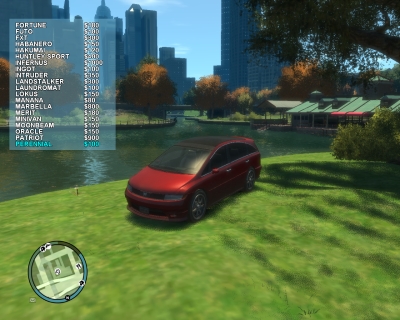
- add menu and car preview (and keymap changed)
- price of rental different in each car model
- minor tweaks
enjoy!
Requirements:
asi loader
Aru's scripthook v0.30
Hazardx's .net scripthook v0.893 BETA
Install:
place the files into .net scripthook's scripts folder
Grand Theft Auto IV\scripts\Rentacar.net.dll
Grand Theft Auto IV\scripts\Rentacar.ini
Keys:
numpad
[8]menu up
[2]menu down
[4]previous page
[6]next page
[5]change color (car load when CARNOLOAD=true)
[9]rent the car
[0]cansel
Rentacar shop:
1.airport
2.north of algonquin middlepark safehouse
3.near of alderney car wash
How to rent a car:
1.go to rentacar shop(you can see on map where shop is)
2.stand by shop assistant
3.choose car numpad 8,2,4,6(5 is change color)
4.enter numpad 9 to rent the car
5.car spawn
6.drive!
7.you have to return car same place
if you broke the car,you have to pay (rental cost * 100)
Notice:
you can not save your car
Settings:
[CONFIG]
CARNOLOAD (false or true)
- if you feel frustration by car select, you can turn off car loading when selected.
MENU_TRANSPARENCY (0-255)
- menu transparency. 255 is no transparent.
MENUCOLOR_(shopname) (web color name)
- menu background color. set color name from web colors(en.wikipedia.org/wiki/Web_colors)
Version History
1.1
- add menu and car preview (and keymap changed)
- price of rental different in each car model
- minor tweaks
enjoy!
Комментарии
Опубликовано комментариев: 2.