GTA IV / Моды / Скриптовые моды (например, *.lua и *.asi)
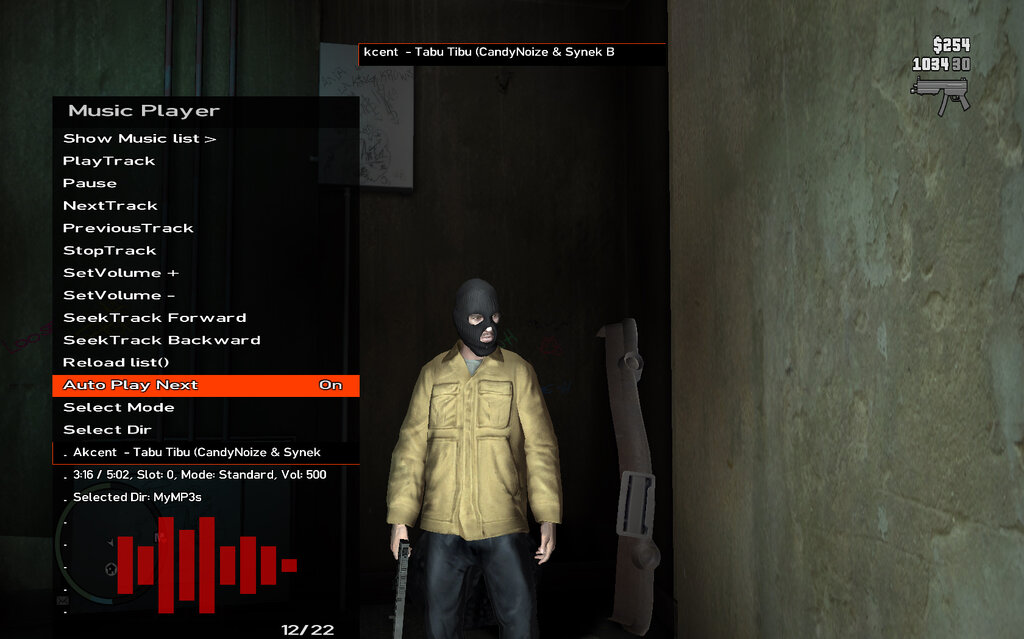
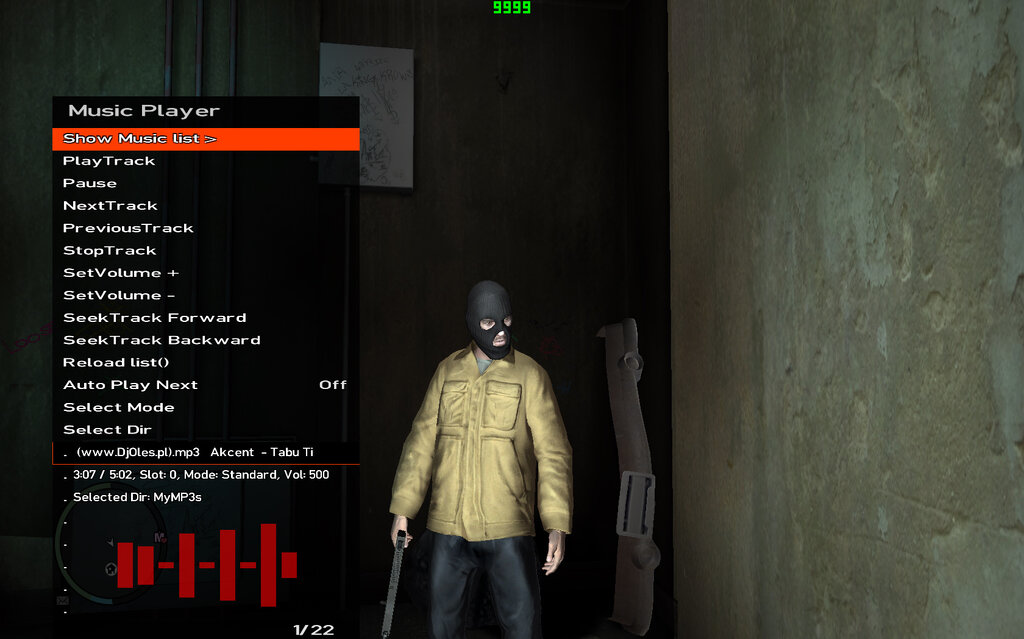
Music Player ASI VIP
- fan script & Gta IV Community | загрузил fan script
- 09/08/2026
- 308 Скачивания
Оценки:
Сначала войди в аккаунт.
Избранное:
Videos
Видео пока не добавлены.Войди в аккаунт, чтобы добавить видео к этому моду.
Описание
dzisiaj mam dla moich fanow
music player asi
do gta 4
zalety
universalny
duzo opcji obsluguje wiele rozszerzen
testowany na wav i mp3
paczka zawiera
music player do gta 4
zrudla ,scripthook sdk i asi script injector
wrzuc pliki np mp3 do folderu scripts/MyMP3s
w folderze gta 4
-----------------
Today, for my fans, I have
an ASI music player
for GTA 4
Features:
Universal
Many options; supports multiple file formats
Tested with WAV and MP3
The package includes:
Music player for GTA 4
Source code
scripthook sdk and asi script injector
Place files (e.g., MP3s) in the `scripts/MyMP3s` folder
located in the GTA 4 directory
Комментарии
Опубликовано комментариев: 2.

09/13/2026 18:51
Remember to replace the files:
from the folder MY SCRYPTING_BASE/Scripting.h
to ScriptHook/Scripting.h
Music player project:
it is located in the SampleCustom folder
replace the `SampleCustom` folder
with the one in ScriptHook/SampleCustom
First, you need to configure the environment
Visual Studio for ScriptHook
To configure Visual Studio for C++ modding
using the original GTA IV C++ Script Hook (by aru),
you must set up the project as a dynamic-link library (DLL)
that will ultimately have the .asi extension.
Here is a step-by-step guide on how to correctly configure the environment:
1.
Prerequisites: Visual Studio installed
with support for the "Desktop development with C++" workload.
Downloaded SDK file from aru (containing .h header files and .lib library files,
such as ScriptHook.lib).
2. Creating a project in Visual Studio: Open Visual Studio
and select "Create a new project." Search for and select "Empty Project (C++)"
or "Dynamic-Link Library (DLL)." Name your project (e.g., MyModifications)
and proceed.
3.
Project property configuration: Right-click on your project name in the Solution Explorer window
and select "Properties." Set the architecture to x86 (Win32), as GTA IV is a 32-bit game. Next, adjust the following sections (ensure "All Configurations" is selected at the top of the properties window): General: Configuration Type: Change to Dynamic Library (.dll). Target Extension: Change from .dll to .asi (this allows Visual Studio to immediately generate a file ready for the ASI Loader). [1] C/C++ → General: Additional Include Directories: Point to the path containing aru's SDK header files (where files like ScriptHook.h, natives.h, etc., are located). Linker → General: Additional Library Directories: Point to the folder containing ScriptHook.lib. Linker → Input: Additional Dependencies: Add "ScriptHook.lib;" to the very beginning of the list (remember the semicolon separating it from the other entries).
Compilation and Installation: Change the build mode from Debug to Release and ensure the platform is set to x86 / Win32. Click Build → Build Solution. You will find the finished .asi file in the project folder (within the Release subfolder). Copy the generated .asi file directly into the main GTA IV game directory. For the mod to work, the correct version of ScriptHook.dll (compatible with your game patch, e.g., 1.0.7.0) and an ASI Loader (e.g., dsound.dll or xlive.dll) must be present in the game directory.
Цитировать | Ответить | (0)
Remember to replace the files:
from the folder MY SCRYPTING_BASE/Scripting.h
to ScriptHook/Scripting.h
Music player project:
it is located in the SampleCustom folder
replace the `SampleCustom` folder
with the one in ScriptHook/SampleCustom
First, you need to configure the environment
Visual Studio for ScriptHook
To configure Visual Studio for C++ modding
using the original GTA IV C++ Script Hook (by aru),
you must set up the project as a dynamic-link library (DLL)
that will ultimately have the .asi extension.
Here is a step-by-step guide on how to correctly configure the environment:
1.
Prerequisites: Visual Studio installed
with support for the "Desktop development with C++" workload.
Downloaded SDK file from aru (containing .h header files and .lib library files,
such as ScriptHook.lib).
2. Creating a project in Visual Studio: Open Visual Studio
and select "Create a new project." Search for and select "Empty Project (C++)"
or "Dynamic-Link Library (DLL)." Name your project (e.g., MyModifications)
and proceed.
3.
Project property configuration: Right-click on your project name in the Solution Explorer window
and select "Properties." Set the architecture to x86 (Win32), as GTA IV is a 32-bit game. Next, adjust the following sections (ensure "All Configurations" is selected at the top of the properties window): General: Configuration Type: Change to Dynamic Library (.dll). Target Extension: Change from .dll to .asi (this allows Visual Studio to immediately generate a file ready for the ASI Loader). [1] C/C++ → General: Additional Include Directories: Point to the path containing aru's SDK header files (where files like ScriptHook.h, natives.h, etc., are located). Linker → General: Additional Library Directories: Point to the folder containing ScriptHook.lib. Linker → Input: Additional Dependencies: Add "ScriptHook.lib;" to the very beginning of the list (remember the semicolon separating it from the other entries).
Compilation and Installation: Change the build mode from Debug to Release and ensure the platform is set to x86 / Win32. Click Build → Build Solution. You will find the finished .asi file in the project folder (within the Release subfolder). Copy the generated .asi file directly into the main GTA IV game directory. For the mod to work, the correct version of ScriptHook.dll (compatible with your game patch, e.g., 1.0.7.0) and an ASI Loader (e.g., dsound.dll or xlive.dll) must be present in the game directory.
Цитировать | Ответить | (0)
09/08/2026 22:43
jak zainstalowac
wrzuc wzystkie pliki
z folderu
script_injector
dinput8.dll
ScriptHook.dll
ScriptHookHook.dll
nastepnie wrzuc wszystkie pliki z folderu
MOD
Menu_config.ini
SampleCustom.asi
nie zapomnij dodac folderow
w kturych program szkuka plikow
mp3
scripts\MyMP3s
scripts\\GameAudio
i tutaj bardzo wazne
otwurz plik
menu_config.ini
i wpisz
pod sekcje
[Settings]
MenuKey=8
8
jak uruchomisz gre
nacisnij na klawiaturze 7
a menu sie otworzy
jak otworzysz music player w grze
dla przykladu
wybierz opcje
select dir
patrz na dole musi byc
select dir: GameAudio
nastepnie kliknij reload list
aby zaladowac ppliki mp3 z folderu wybranego
no i kliknij playtrack
---------------------------
How to install:
Copy all files from the folder:
script_injector
dinput8.dll
ScriptHook.dll
ScriptHookHook.dll
Then copy all files from the folder:
MOD
Menu_config.ini
SampleCustom.asi
Don't forget to add the folders
where the program looks for MP3 files:
scripts\MyMP3s
scripts\GameAudio
And this is very important:
Open the file
menu_config.ini
and enter
under the section
[Settings]
MenuKey=8
8
When you launch the game,
press 7 on your keyboard,
and the menu will open.
When you open the in-game music player,
for example,
select the option
select dir
Make sure it says the following at the bottom:
select dir: GameAudio
Then click reload list
to load the MP3 files from the selected folder,
and finally, click playtrack.
Цитировать | Ответить | (0)
jak zainstalowac
wrzuc wzystkie pliki
z folderu
script_injector
dinput8.dll
ScriptHook.dll
ScriptHookHook.dll
nastepnie wrzuc wszystkie pliki z folderu
MOD
Menu_config.ini
SampleCustom.asi
nie zapomnij dodac folderow
w kturych program szkuka plikow
mp3
scripts\MyMP3s
scripts\\GameAudio
i tutaj bardzo wazne
otwurz plik
menu_config.ini
i wpisz
pod sekcje
[Settings]
MenuKey=8
8
jak uruchomisz gre
nacisnij na klawiaturze 7
a menu sie otworzy
jak otworzysz music player w grze
dla przykladu
wybierz opcje
select dir
patrz na dole musi byc
select dir: GameAudio
nastepnie kliknij reload list
aby zaladowac ppliki mp3 z folderu wybranego
no i kliknij playtrack
---------------------------
How to install:
Copy all files from the folder:
script_injector
dinput8.dll
ScriptHook.dll
ScriptHookHook.dll
Then copy all files from the folder:
MOD
Menu_config.ini
SampleCustom.asi
Don't forget to add the folders
where the program looks for MP3 files:
scripts\MyMP3s
scripts\GameAudio
And this is very important:
Open the file
menu_config.ini
and enter
under the section
[Settings]
MenuKey=8
8
When you launch the game,
press 7 on your keyboard,
and the menu will open.
When you open the in-game music player,
for example,
select the option
select dir
Make sure it says the following at the bottom:
select dir: GameAudio
Then click reload list
to load the MP3 files from the selected folder,
and finally, click playtrack.
Цитировать | Ответить | (0)