GTA IV / Моды / ENB Series / Графика
PC Enb series reflection
- boris, Farel
- boris-vorontsov.narod.ru/in...
- 08/19/2009
- 59740 Скачивания
Оценки:
Сначала войди в аккаунт.
Избранное:
Скачать
66.68Kb
66.68Kb
Videos
Видео пока не добавлены.Войди в аккаунт, чтобы добавить видео к этому моду.
Описание
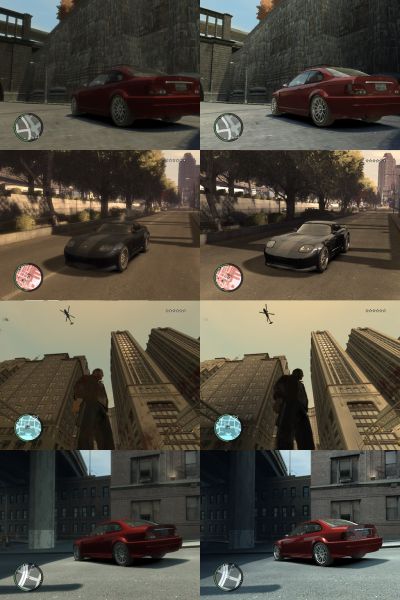
This mod is for better reflection in GTA 4 PC
only put this two files to the your Game directory
http://boris-vorontsov.narod.ru/index_en.html
only put this two files to the your Game directory
http://boris-vorontsov.narod.ru/index_en.html
Комментарии
Опубликовано комментариев: 14.

07/05/2013 14:31
nope,wont work with 1.0.7,have the 26 & 40 dll,win 7 64-bit.
Цитировать | Ответить | (0)
nope,wont work with 1.0.7,have the 26 & 40 dll,win 7 64-bit.
Цитировать | Ответить | (0)
11/27/2009 17:07
I got two files in my GTA main folder :P. but how do i active it xD?
Цитировать | Ответить | (0)
I got two files in my GTA main folder :P. but how do i active it xD?
Цитировать | Ответить | (0)
09/13/2009 20:52
I also didn't really notice a difference
anyone else see signifigant gains or am i alone
Цитировать | Ответить | (0)
I also didn't really notice a difference
anyone else see signifigant gains or am i alone
Цитировать | Ответить | (0)
09/13/2009 20:51
I get the same error message and a prompt about d.e.p and all that crap
Цитировать | Ответить | (0)
I get the same error message and a prompt about d.e.p and all that crap
Цитировать | Ответить | (0)
08/22/2009 18:22
I get a error message when i close GTA. When i remove the files from this download i dont get any error.
Description of error:
Critical Runtime Problem.
Цитировать | Ответить | (0)
I get a error message when i close GTA. When i remove the files from this download i dont get any error.
Description of error:
Critical Runtime Problem.
Цитировать | Ответить | (0)
08/20/2009 18:01
To AsiHrvat:
Go to www.dll-files.com
type the name of the dll file (in this case type d3dx9_40) and there you can find it, download it, extract it, and the dll file paste it in C:WINDOWSsystem32 folder and then it should work fine ;)
Цитировать | Ответить | (0)
To AsiHrvat:
Go to www.dll-files.com
type the name of the dll file (in this case type d3dx9_40) and there you can find it, download it, extract it, and the dll file paste it in C:WINDOWSsystem32 folder and then it should work fine ;)
Цитировать | Ответить | (0)
08/20/2009 05:49
hmmm doesn´t work at my game he couldn´t found d3dx9_40.dll
Цитировать | Ответить | (0)
hmmm doesn´t work at my game he couldn´t found d3dx9_40.dll
Цитировать | Ответить | (0)