GTA V / Моды / Моды
Colorful Icons (Radio + Weapons)
- Polopai | загрузил milic11
- 05/28/2015
- 7592 Скачивания
Оценки:
Сначала войди в аккаунт.
Избранное:
Videos

Войди в аккаунт, чтобы добавить видео к этому моду.
Описание
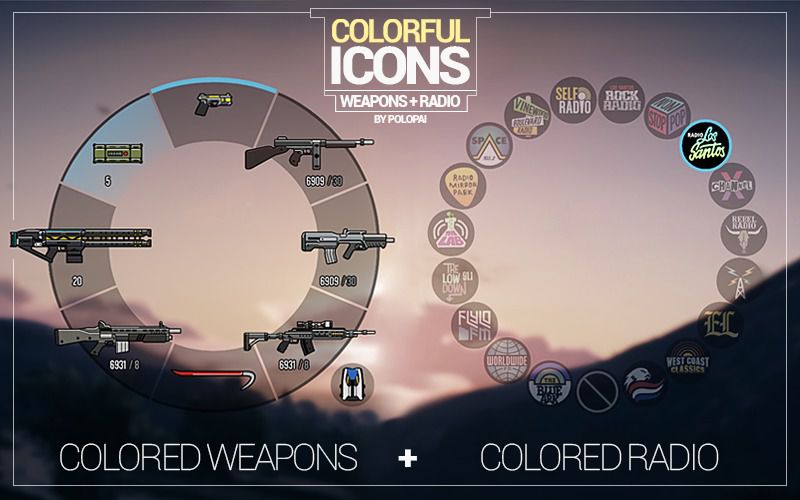
• Colored Weapon Icons
• Colored Radio Icons (made by Polopai)
• Colored Radio Icons (official colors made by Rockstar)
• Backups of the original files
This mod combines my other two mods, released individually. It will color the icons shown on the radio wheel and on the weapons wheel (it will also color the weapon icons displayed when inside a vehicle that has its own weapons, such as helicopters, jets and military land vehicles).
1.1:
• Added an alternative version of the radio icons that will use the official colors made by Rockstar (thanks to PlasticTangerine's mod)
Installation:
1. Download OpenIV from www.openiv.com, install it and open GTA V for Windows.
2. Go to update/update.rpf/x64/patch/data/cdimages/scaleform_generic.rpf
3. Click on the "Edit Mode" button on the top bar.
4. Then click on the green plus icon that says "Add new file" and import the 'hud.ytd' and 'mp_big_message_freemode.ytd' provided by this mod (you can find these files inside the 'Colorful Icons' folder).
5. Close OpenIV and start the game!
Feel free to do the same thing with the original files located inside the 'Backups' folder provided by this mod in order to revert the changes and go back to the old grayed icons. This is recommended if you want to play online, as Rockstar doesn't allow any modded files, even if it's a texture.
Enjoy! :)
• Colored Radio Icons (made by Polopai)
• Colored Radio Icons (official colors made by Rockstar)
• Backups of the original files
This mod combines my other two mods, released individually. It will color the icons shown on the radio wheel and on the weapons wheel (it will also color the weapon icons displayed when inside a vehicle that has its own weapons, such as helicopters, jets and military land vehicles).
1.1:
• Added an alternative version of the radio icons that will use the official colors made by Rockstar (thanks to PlasticTangerine's mod)
Installation:
1. Download OpenIV from www.openiv.com, install it and open GTA V for Windows.
2. Go to update/update.rpf/x64/patch/data/cdimages/scaleform_generic.rpf
3. Click on the "Edit Mode" button on the top bar.
4. Then click on the green plus icon that says "Add new file" and import the 'hud.ytd' and 'mp_big_message_freemode.ytd' provided by this mod (you can find these files inside the 'Colorful Icons' folder).
5. Close OpenIV and start the game!
Feel free to do the same thing with the original files located inside the 'Backups' folder provided by this mod in order to revert the changes and go back to the old grayed icons. This is recommended if you want to play online, as Rockstar doesn't allow any modded files, even if it's a texture.
Enjoy! :)
Комментарии
Опубликовано комментариев: 2.

09/25/2016 06:12
Would you be working on a PlayStation version in the near future
Цитировать | Ответить | (0)
Would you be working on a PlayStation version in the near future
Цитировать | Ответить | (0)

